
How to publish a Story on Amethyst Writers

Starting your writing journey can be overwhelming, there are too many options and you don’t really know where to go to publish your first webnovel. Worry not as this tutorial will show you how things are done.
Accessing your User-Settings menu

After signing up to Amethyst Writers, you’ll be able to access your User-Settings menu. this is where most of your writing journey on the website will be happening. Once you have access to it, click on ADD NOVEL and fill out the form.
Fill out the webnovel creation form
Filling out the form to create your story is pretty straightforward. However, there are some things you need to know in order to fully exploit our system.
Section 01
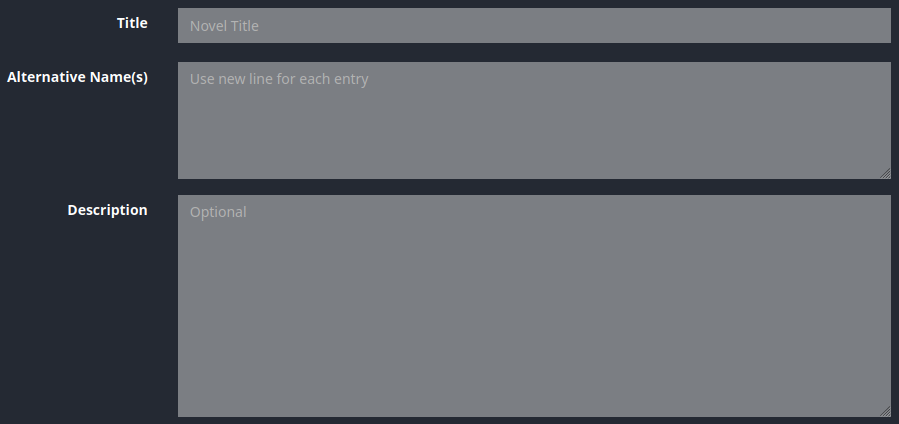
Title: the title of your webnovel.
Alternatives Name(s): the name of your webnovel in different languages. It can be French, Spanish, Japanese, German… Just don’t forget to put a comma (,) after each different name.
Description: the summary of your story.
Section 02

Novel Cover: This is the cover of your story, the visual that makes readers want to take a look at your novel. The ratio for it 1:1.5 with an ideal minimum resolution of 300×450.
Horizontal Novel Cover: This is the cover that will appear on the desktop version of the homepage. If your story is among the best novels on our platform, it will be displayed there for everyone to see. The ideal resolution for it is 1254×600.
Square Thumbnail: It is the same thing as the Horizontal Thumbnail except that it is for the mobile version of the homepage. The minimum resolution for it is 430×430.
Section 03
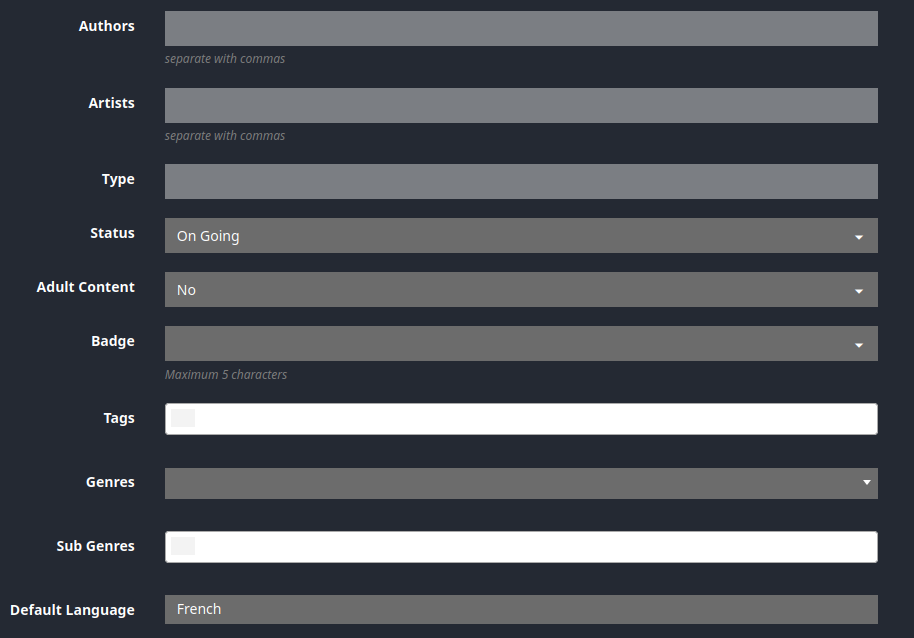
Authors: This is where you put your author’s name. If there are several authors, each author’s name should be separated by a comma (,).
Artist: You put the name of your illustrator here, whether it be the one who draw your novel cover, your characters, or even your fictional map, it goes here.
Type: You leave this part empty. It will come in handy in one of our upcoming updates.
Status: This is self-explanatory. This is where you indicate the status of your novel, whether it be On going, On hold, or Completed.
Adult Content: This is self-explanatory as well.
Badge: Here, you’ll have to select between HOT and NEW. NEW is for when you just created your story on our website. This badge will naturally disappear after 30 days. As for the HOT one, it’s for the most read novels on our website. It will disappear if your story is not among the Top 100 in your genre.
The 4 remaining are also self-explanatory. They are related to the genre, subgenre, and the language your story will be published in.
After doing all of that, you’ll now have to click on the Add new title button to add your story to our database. Once it’s done, go to Upload Chapter in your User-Setting menu to start adding chapters to your novel.