
How to publish a chapter on Amethyst Writers

Publishing a chapter on Amethyst Writers is as easy as saying Hello to someone you like. Here’s how you properly do it.
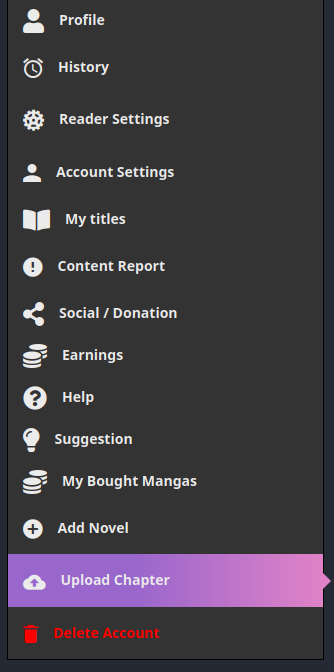
The first thing you need to do is to go to access your USER-SETTING menu then click on UPLOAD CHAPTER. Easy, right? This is exactly where the fun begins and where Amethyst Writers shows you how it does stuff.
This is one of the most important section to master during your journey on Amethyst Writers. from top to bottom we have:
Novel: here you select the novel you want to add a chapter to.
Chapter number: the numerical identifier of your chapter. This number is very important as it is used to keep your chapters in order.
Chapter volume: Does your story contain several volumes? If the answer to this question is Yes, this is the place where your create and attribute chapters to a specific volume of your story.
Chapter title: this is the first part of your story chapter. It contains a single word followed by a number, (example: Chapter 1/Act 1/Episode 1)
Chapter extend name: this is the second part of your story chapter, the one containing the extra description, (example: Chapter 1: Winter falls/ Act 1: Winter falls/ Episode 1: Winter falls)
Language: Amethyst Writers allows you to publish the same exact chapter in different so that you can attract readers from different horizons.
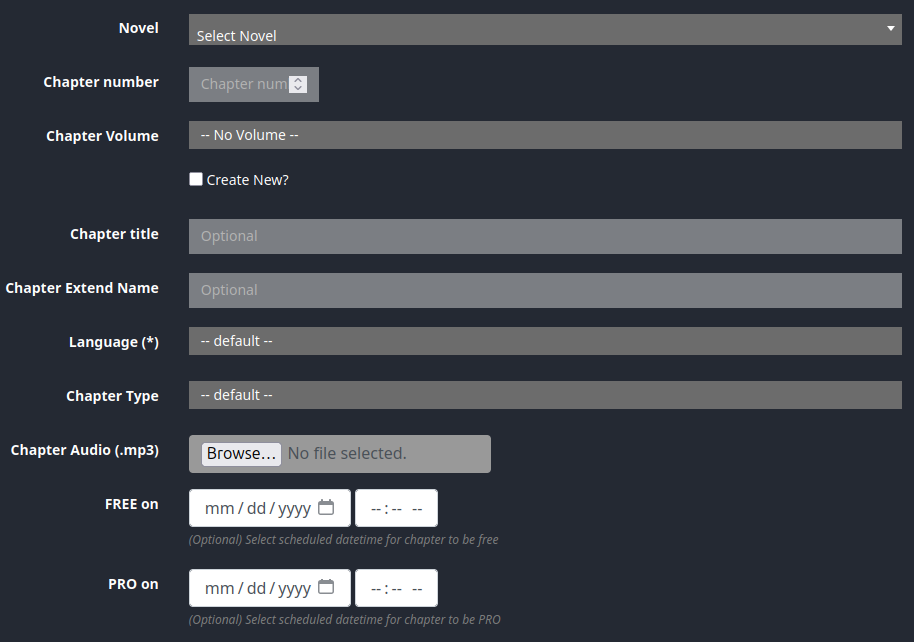
Chapter audio: Do you have an audio version of your chapter? If the answer to that question is Yes, then this option is made for that. Upload your MP3 and let your readers listen to your beautiful story.
FREE on/PRO on: after filling out your address information on the ACCOUNT SETTINGS page, those two options will be available for you to use. FREE on allows you to set a timer for when you want your chapter to turn from Premium to Free, whereas PRO on allow you to do the opposite Free to Premium.
Once everything has been properly filled out, the only thing left for you to do is to just write down/paste your chapter and click on ADD Chapter. Congratutalions!!! You’ve made it, you’ve published a chapter on Amethyst Writers. Your journey has officially begun.